Feb 28, 2011
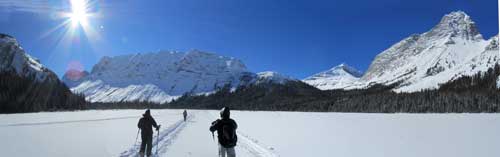
Those of you that know me know I teach Photoshop, Illustrator and InDesign four months of the year. I find it really exciting and a great way to keep my skills up. I spend some time checking out tutorials and this is one of my favourites, photoshoplady.com. I’ll try posting some real timesavers for those of you that use those programs in upcoming posts. The picture below was made by combining four photos into one, it was as easy as reading this blog.
Here’s how: In Photoshop, select the menu item, FILE. then AUTOMATE, then PHOTOMERGE, and click the browse button to select the photos you want to merge. On the left side of the dialog box, just click how you want the finished composition. Voila, depending on processor speed, you’ll have a beautiful panorama in a couple of minutes.

Feb 18, 2011
When you think of designers, you don’t necessarily think of heroes. This is where we honour those unsung heroes.
 The first hero is the Deadline Phantom
He smashes through the fabric of time and bends it to his will. He conquers deadlines–a master of punctuality and billable hours–time is truly on his side. A logo before lunch? Roughs by coffee? … It’s already done!

Our next hero is the Creative Colossus
With his sidekick–”Kid Inspiration”, he battles his arch enemy –“The Block”. Creative Juices and Sparks of Creativity are his secret weapons in his quest to free the world from the dreaded scourge–The Cliché.

Not all heroes are men, there is the Logo Doyenne
Saving countless clients the agony and lost business from having a logo appear in a publication too small. Without her, clients would have to endure logos that weren’t blue! She upholds those logos with the initials of the company in them, or italicized caps and any kind of swoosh.

Not to be forgotten is the most powerful of all the heroes, The Revisionator
He makes multiple revisions on the fly, he’s real time, he’s a Chicago style spell checking maniac.” One more change” is his daily beat. He can change an em dash to a hyphen and back again quicker than you can say “umlaut”.

Feb 16, 2011
Illustration that has something to say, politically, and about who we are is always compelling. If you love editorial op-ed illustration as much as I do, here’s a great video. If you don’t know much about it, check the link for a great primer on the heroes of that genre. nytimes.com

Feb 8, 2011
I’ve mentioned snowshoeing before in this blog, can’t get enough of it this winter. It’s a fantastic low impact way to get a great workout and learn some backcountry skills. This image is a view of the back of Castle Mountain standing on the glacial Tower Lake. To get a view like this, you have to hike in deep snow for 4.5 hours, up the south face of Castle Mountain. It’s only 2.5 hours to get back down. It’s so quiet up there, all you can hear is your own breath.

Feb 8, 2011
I know this won’t seem like a design or illustration post–but it is. I regularly check out Mark Hurst’s good experience site. He’s an inspiration to me, because he has one simple message that applies to designing anything—what’s the experience like. So many websites are designed not for the user, but for the executive who is charged with getting a website designed. Logos designed because a client likes something rather than coming up with a logo their clients will connect with and makes them feel confident. Mark takes on the experience of going to see the doctor and the resulting bad experience. Good design should consider the experience for the user of a product or service.